Best Mobile Printers for Vehicles: On-the-Go Printing Solutions 2026
Need a portable printer that proves reliable in a car, truck, or field vehicle? This guide highlights five top mobile printers suited for in-vehicle use, spanning inked and inkless options, battery-powered models, and Bluetooth-enabled devices. Each pick is evaluated for work flexibility, ease of connectivity, and print quality so you can choose the right fit for road trips, fieldwork, or mobile offices. Suitable buyers include traveling professionals, remote workers, students, and contractors who require on-demand prints while away from a traditional desk.
Summary of chosen products (quick reference):
| Product | Best For | Key Benefit | Limitations |
|---|---|---|---|
| Canon PIXMA TR160 | Lightweight travel printers | Sharp text and color, 5-color ink system | Requires compatible mobile apps for best experience |
| NDYIN N80 | Inkless on the go | Direct thermal printing with no ink | Limited to US Letter and A4 paper sizes |
| Gloryang Inkless Portable Printer | Travelers needing case + extra rolls | Includes carry case and 3 rolls of paper | Requires Gloryang thermal paper |
| TATTMUSE A285M | Compact multi-size printing | Supports multiple thermal paper sizes | Driver setup needed for computers |
| HP OfficeJet 250 | All-in-one mobile printing | Printer, scanner, and copier in one | Battery value varies by kit; check compatibility |
Canon PIXMA TR160 Wireless Portable Printer

The Canon PIXMA TR160 is a lightweight, highly portable printer designed for on-the-go use. It supports 8.5″ x 11″ documents and photos with a 5-color Hybrid Ink System for sharp black text and vibrant color detail. Connectivity is streamlined through Canon PRINT, Apple AirPrint, Mopria, and cloud options, making it a practical choice for in-vehicle setups where you need quick document or photo prints from a mobile device. Best for travelers who want reliable photo-quality prints along with standard documents in a compact form factor. Caution: Wireless setup may require app updates or driver alignment on first use.
NDYIN Portable Printer N80 (Wireless Thermal)

The NDYIN N80 is an inkless, wireless thermal printer that supports 8.5″ x 11″ US Letter and A4 paper. It connects via Bluetooth for mobile printing and USB-C for laptops or desktops (drivers required). This model is best for drivers and field workers who want a no-ink, low-maintenance option for receipts, forms, and simple documents. Better for short, quick prints on the go but not ideal for photo-heavy printing. Limitation: Bluetooth connection can be device-dependent, and desktop drivers may require setup time.
Gloryang Inkless Portable Printer

The Gloryang inkless portable printer uses thermal technology with no ink, toner, or ribbons. It includes a carry case and three rolls of paper, making it a strong option for travelers who need a ready-to-go kit. It connects via Bluetooth using the Jadens Printer app and can also be set up with a driver for computer printing. Best for on-the-road documentation needs or contracts where a quick print is required. Caution: Requires Gloryang-specific thermal paper for optimal results.
TATTMUSE A285M Wireless Portable Printer

The A285M is a small, lightweight wireless printer that supports five sizes of thermal paper, including US Letter and A4. It integrates easily with iPhone, Android, and laptops via USB-C with driver installation recommended for computers. Best for mobile professionals who need flexibility in paper sizes without sacrificing portability. Limitation: Paper size switch and driver installation can add setup time for new users.
HP OfficeJet 250 Wireless Mobile Printer

The HP OfficeJet 250 is an all-in-one portable printer that includes printing, scanning, and copying in a compact form with wireless connectivity. It is designed for business printing anywhere, with a battery included in some kits. Best for users who require a versatile, compact, all-in-one device for documents and light imaging on the road. Caution: Battery performance varies by usage and charge cycles; verify compatibility with your in-vehicle power setup.
HP OfficeJet 200 Wireless Mobile Printer

The HP OfficeJet 200 offers portable business printing with a battery-inclusive setup and a user-friendly HP app for on-the-go scanning and printing. It is best for professionals who need a straightforward, reliable printer for documents and forms during travel. Choose this if you prioritize a simple workflow and robust mobile app integration. Limitation: Battery life should be considered for long trips; plan for charging options in vehicles.
Phomemo Portable Printer M08F
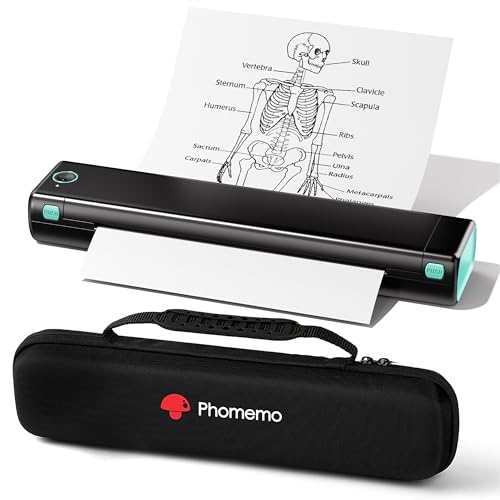
The Phomemo M08F is a Bluetooth-enabled inkless thermal printer designed for travel and on-the-go use. It supports PDF, Word, and image printing from mobile devices and can connect via USB for computer printing with driver installation. Best for students or field workers who need a compact printer for quick receipts and notes. Caution: Thermal paper and app compatibility are essential for reliable operation; ensure your device supports the Phomemo app.
Buying Guide: Key Purchase Considerations
- Printer type: Choose between inkjet, laser, and thermal (inkless) based on print needs. Thermal printers excel in receipts and forms, while inkjet offers higher color quality for photos.
- Power source: Look for built-in batteries for true vehicle use, or rely on vehicle power with USB charging if the printer stays plugged in during trips.
- Connectivity: Bluetooth is common for phones and tablets; Wi-Fi or USB-C can improve compatibility with laptops and in-car infotainment systems.
- Paper size support: Ensure the printer supports US Letter or A4 if you frequently print standard documents; consider multi-size options for versatility.
- Paper availability and cost: Inkless thermal paper reduces ongoing cost, but verify availability and cost per page for your typical print volume.
- App and driver setup: Some models require app use or drivers on computers. Factor in setup time when choosing a model for in-vehicle use.
Frequently Asked Questions
- What is the best mobile printer for car use?
- Do mobile printers work with smartphones directly?
- Are inkless printers cheaper to operate?
- Can I print photos with these mobile printers?
- Do these printers require internet access?
- Is a built-in battery important for vehicle use?
The best option depends on your needs. For inkless, low-maintenance printing, thermal printers like the NDYIN N80 or Gloryang model are strong choices. For all-in-one functionality in a compact form, the HP OfficeJet 250 is a solid option.
Yes. Most listed models support printing via Bluetooth from iOS and Android devices, and many offer companion apps to simplify setup and printing tasks.
Generally yes, since they do not require ink or toner. However, the cost of thermal paper and per-page price should be considered for the total cost of ownership.
Some models print photos, especially those with color capabilities. Inkjet portable printers typically handle photos better than thermal options, which are better for receipts and documents.
Most in-vehicle printers do not require a constant internet connection. They rely on Bluetooth or direct USB-C connections for printing tasks.
In-vehicle printing benefits from a built-in battery for true off-grid use, but some models work well when plugged into a vehicle’s power supply or a portable battery pack.