Best No-Drill Laptop Mounts for Vehicles: Secure, Adjustable, and Ready to Go 2026
If you need a no-drill laptop mount for a vehicle, these top options provide secure, adjustable support that clamps to existing seat bolts without modifying your car. They’re ideal for mobile workers, fleet drivers, and anyone who wants a reliable workstation on the go. The best picks cater to different vehicle types, from compact trucks to full-size SUVs, and balance stability with ease of use.
| Product | Main Benefit | |
|---|---|---|
| MELIPRON Truck Laptop Mount (B0CSYBN83T) | Dual cooling fans, full-motion adjustability | Rough-road use and heavy workloads |
| SPIRRELAB Car Laptop Mount (B0D9N2NW74) | Triangular base, secure clamps, built-in USB cooling | High-heat environments and long shifts |
| MELIPRON Truck Laptop Mount for 19–26 Chevy (B0D927JF9S) | Vehicle-specific fit, four locking joints | Chevy trucks and 3rd-party vehicle compatibility |
| RAM MOUNTS Universal Vehicle Laptop Mount (RAM-VB-196-SW1) | No-drill, universal base, dual swing arm | Multiple vehicle types and quick setups |
| VIVO Single Laptop Car Mount (MOUNT-CAR01) | Three mounting feet, full articulation | Wide vehicle compatibility and flexible viewing angles |
MELIPRON Truck Laptop Mount for Cars, Vans, Vehicles

The MELIPRON no-drill mount uses a rugged aluminum and steel build with built-in dual USB cooling fans to prevent overheating. It offers height, tilt, and 360° rotation adjustment for optimal viewing angles. It attaches directly to the passenger seat rail bolts, preserving your car’s structure. This makes it suitable for fleet use or personal vehicles where drilling is not an option. Best for: heavy-duty mobile work on varied roads. Caution: ensure seat rail availability before purchase.
SPIRRELAB Car Laptop Mount with 2 Cooling Fans

This mount emphasizes stability with a triangular base formed by two base mounting points and riser bases. It supports laptops up to 17 inches and uses anti-slip, high-friction tray material to reduce device movement. Two USB cooling fans help manage heat, extending component life during long shifts. Best for: drivers who need strong stability and heat management. Caution: heavier laptops may require careful weight distribution.
MELIPRON Truck Laptop Mount for Chevy Silverado and More

This vehicle-specific MELIPRON model targets popular trucks like Chevy Silverado and GMC Sierra. It uses a three-point support base to stabilize the laptop and offers height adjustment from 11.9” to 20” plus 360° rotation. Four locking joints enable precise positioning for safe viewing. Best for: drivers of large crew cabs who want a dedicated truck-compatible solution. Caution: check exact vehicle year compatibility before ordering.
RAM MOUNTS Universal Vehicle Laptop Mount (RAM-VB-196-SW1)

RAM MOUNTS offers a no-drill installation using existing passenger seat bolts with a universal base and a dual swing arm. Its patented ball-and-socket system helps dampen shocks and vibrations, making it suitable for fleets and varied vehicle types. Best for: users who value quick, tool-free installation. Caution: compatibility should be verified for very large laptops.
VIVO Single Laptop Car Mount (MOUNT-CAR01)
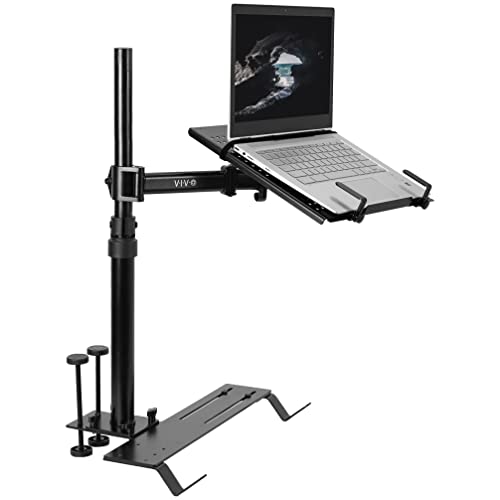
The VIVO MOUNT-CAR01 uses a telescoping pole and a 14.2” x 11.9” tray to accommodate laptops up to 17 inches. It provides three mounting feet for broad vehicle compatibility and a full range of tilt, swivel, rotation, and height adjustments. Best for: drivers who need flexible positioning in multiple vehicle types. Caution: ensure the mounting feet align with your floor bolts for secure setup.
Buying Guide
What should you consider when choosing a no-drill laptop mount for a vehicle?
- Vehicle compatibility: Some mounts are truck-specific, others are universal. Check mounting points and seat bolt compatibility before purchasing.
- Laptop size and weight: Ensure the tray supports your laptop’s dimensions and weight. Some trays handle up to 17 inches and a few support heavier devices.
- Stability and cooling: Look for bases that distribute load well and include cooling fans or ventilated trays to prevent overheating on long drives.
- Adjustability: A broad range of height, tilt, rotation, and swivel options improves comfort and reduces strain during long work sessions.
- Installation and removal: No-drill installations are ideal for fleets or renters. Consider if you need to remove the mount quickly.
- Durability: Materials like aluminum, steel, and reinforced plastics contribute to longevity under road vibrations.
FAQ
- Are no-drill laptop mounts secure for highway use? Yes, many models use seat-bolt connections and heavy bases to resist vibrations and movement.
- Can these mounts fit laptops of different sizes? Most supports range from 12″ to 17″ screens, with varying weight limits; verify your device specs.
- Do they require professional installation? No-drill mounts are designed for easy installation by vehicle owners with basic tools or none at all.
- Will fastening impact seat removal or seat airbags? Reputable models are designed to avoid critical areas; always follow manufacturer instructions and vehicle safety guidelines.
- Which mount is best for trucks vs. cars? Truck-focused mounts often emphasize heavy-duty bases and larger trays; car-focused options prioritize compact form and flexibility.
- Can I reuse a mount across multiple vehicles? Universal bases from RAM MOUNTS and similar brands are designed for multi-vehicle use, but always confirm bolt positions and clearances.