Best Tablet Mounts for Trucks: Durable, Secure Dash and Cab Mounts 2026
If you drive a commercial vehicle and need reliable, vibration-resistant tablet mounting, these options are tailored for truck use. The top picks below are best for fleet operators, independent drivers, and warehouse personnel who require easy access to tablets in rugged environments. Each product section explains who it’s best for and why it stands out, plus a practical caution where relevant.
| Product | Device Range | Best For |
|---|---|---|
| iBOLT TabDock Bizmount AMPS | 7″–11″ tablets | Best for heavy-duty, all-terrain truck installations |
| OHLPRO Tablet Holder for Car & Truck Dashboard | 5″–13″ tablets | Best for versatile dashboard mounting with 360° rotation |
| Cup Holder Car Tablet Mount by Porfortop | 4.7″–12.9″ devices | Best for cup-holder mounting with long reach and 360° rotation |
| Tablet Holder for Truck by Truckules | Typically 7″–12.9″ range (extended 16.7″ arm) | Best for long-arm, high-visibility truck mounting |
| OHLPRO Tablet Mount for Truck (8-inch Arm) | 5″–13″ tablets | Best for flexible mounting on dashboards or walls |
Note: Each option provides varying degrees of adjustability, mounting bases, and installation requirements. Consider your dashboard space, vibration levels, and whether you need wall, cup-holder, or dash mounting when choosing.
iBOLT TabDock Bizmount AMPS — Heavy-Duty Drill Base Tablet Mount
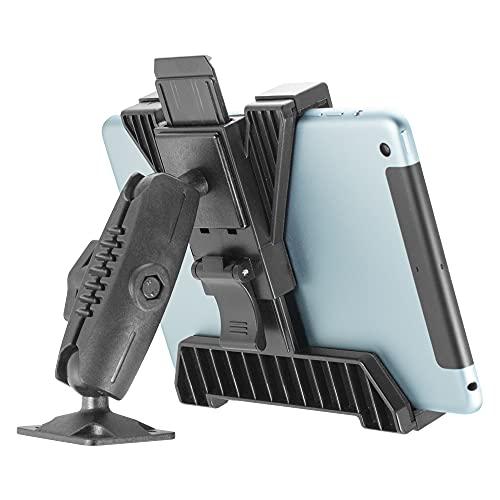
Best for: Fleet vehicles and industrial trucks needing a rugged, secure mount. The TabDock Bizmount AMPS uses a four-point grip and a 1-inch (25mm) ball joint system compatible with common 1-inch arms. It accepts 7″–11″ tablets and supports horizontal or vertical positioning without slipping. The design aims to stay locked in place under heavy-duty use, making it suitable for commercial settings with vibrations.
Why chosen: This mount emphasizes a universal 4-hole AMPS pattern and a strong dual ball joint pedestal, which helps maintain stability across multiple mounting arms. It’s a practical pick for drivers who require consistent landscape or portrait views without readjustments on rough roads.
Caution: Installation involves securing a drill base; ensure you have permission to drill the mounting surface and follow safety guidelines to avoid damage or voiding vehicle warranties.
OHLPRO Tablet Holder for Car & Truck Dashboard

Best for: Drivers who need 360° adjustability and a robust dashboard mount. The OHLPRO mount uses a 4-hole drill base and 360° rotation with two adjustable points, enabling easy landscape-to-portrait transitions without obstructing the driver’s view. It’s suited to tablets 5″–13″ and supports a range of devices, including iPad Pro and Galaxy tablets.
Why chosen: The combination of a long arm, rotation options, and strong drilling base makes it a flexible option for dashboards or walls. It’s a solid choice when you want precise viewing angles during long hauls and varying cabin layouts.
Caution: Requires drilling; ensure you select a safe mounting surface and comply with vehicle guidelines and warranties before installation.
Porfortop Cup Holder Car Tablet Mount

Best for: Vehicles that rely on cup-holder mounts with a long reach. This mount extends from 11″ to 15″ and fits devices from 4.7″ to 12.9″ with 360° rotation and a flexible arm. It includes a stable base to prevent wobble, which is useful for truck cabs with variable motion.
Why chosen: The upgraded base and wide device compatibility provide a practical all-in-one solution for in-cab navigation, calling, and app use. It’s especially helpful for crew vehicles that share devices among drivers.
Caution: The clamp and arm extend significantly; ensure it doesn’t interfere with gear shifts or driver visibility in tight spaces.
Truckules Tablet Mount — Long 16.7-Inch Arm

Best for: Truckers who need a long-reaching arm to position tablets away from the dashboard for optimal visibility. The 16.7-inch arm uses a three-point architecture and a strong vacuum-based base for solid grip on varied surfaces.
Why chosen: Its extended reach lets drivers adjust the tablet without obstructing controls, making it ideal for larger cockpits or crowded dashboards. The high-traction base helps maintain stability in rough road conditions.
Caution: Check compatibility with your vehicle’s interior and confirm there is no interference with air vents or instrument panels before installation.
OHLPRO Tablet Mount with 8-Inch Arm

Best for: Dash or wall mounting where a shorter, stable arm is preferred. The 8-inch arm and 4-hole drilling pattern offer a reliable setup for many 5″–13″ tablets, including iPads and Samsung devices.
Why chosen: The upgraded arm length and 360° swivel ball head make it easy to switch orientations and angles without losing stability, which is valuable for multi-vehicle fleets with different dashboards.
Caution: As with other drill-based mounts, ensure proper drilling practice and vehicle manufacturer guidelines to avoid compromising structural components.
Buying Guide: Choosing The Right Truck Tablet Mount
- Decide between dash, cup-holder, wall, or desk-style bases. Dash mounts offer direct reach, cup-holder mounts maximize cabin space, and wall/desks provide flexible positioning in truck cabs or workshops.
- Confirm your tablet size range (4.7″–12.9″ or larger) and thickness, especially if you use rugged cases. Universal patterns (AMPS) improve compatibility with arms and adapters.
- Heavy-duty mounts with four contact points or vacuum-based bases tend to perform better on rough roads. Look for locking mechanisms and multi-point grips to minimize slippage.
- A 360° rotation and tilt can improve viewing angles for navigation, video calls, or fleet apps. Consider mounts with adjustable arms to avoid obstructing the driver’s view.
- Some mounts require drilling; others clamp to existing surfaces. Verify vehicle warranty terms and ensure you have the proper tools and space for installation.
- Stainless steel or aluminum arms with reinforced joints offer longer lifespans in high-vibration environments. Temperature resistance is also a factor in trucks exposed to heat or cold.
- Quick-release features or simple release mechanisms help when devices need frequent removal for security or charging elsewhere.
FAQ
- Do I need to drill into my vehicle to install these mounts? Some mounts use a drill base and require drilling; others use clamps or cup-holder bases. Check the installation instructions and vehicle tolerance before proceeding.
- Which mount is best for a large tablet (12.9″ or larger)? Look for mounts rated for 12″–18″ devices or those with wide clamp ranges and longer arms to ensure secure fit and reach.
- Is 360° rotation necessary for trucking use? It’s helpful for switching between landscape and portrait modes, particularly for navigation apps and fleet software.
- Will these mounts affect driver visibility? Choose mounts with compact profiles and test positioning to avoid obstructing instrument panels, airbags, or line of sight.
- Are vacuum bases reliable for trucks? Vacuum or gel-based bases can be strong on flat surfaces, but ensure the surface is clean and dry for best adhesion and avoid overloading the base with heavy tablets.
- Can I reuse mounts across vehicles? Many mounts use universal patterns (AMPS) but confirm arm length, base type, and mounting surface compatibility before moving between different vehicle interiors.